
Keycloak vs Microsoft Entra ID: Comparison and Differences
What is Microsoft Entra ID and What is It Used For?
Microsoft Entra ID is Microsoft’s cloud service dedicated to digital identity and access management (Identity and Access Management, IAM). Delivered entirely in SaaS mode, it allows organizations to manage authentication processes, enable Single Sign-On (SSO) for employees, configure Multi-Factor Authentication (MFA) and apply security policies to corporate devices.
The platform is particularly suitable for organizations that make extensive use of Microsoft 365, Azure and Intune, as it centralizes identity management within an integrated environment, without requiring the maintenance of a local authentication infrastructure.
Keycloak vs Entra ID: Comparison of IAM Features
Keycloak and Microsoft Entra ID address identity management needs through two different approaches. Keycloak is an open-source IAM platform that allows companies to maintain control over the execution environment. It can be installed on on-premise infrastructure, Kubernetes clusters or cloud environments, leaving the organization responsible for operational management.
Microsoft Entra ID, on the other hand, follows a managed service model: Microsoft takes care of the cloud infrastructure, scalability and application of security patches, reducing the technical workload for the company.
The difference also concerns customization options. Keycloak allows in-depth modifications to the configuration of realms, user models and authentication processes, including through extensions developed in Java using the Service Provider Interface (SPI). Entra ID provides configurable features through a structured environment, designed to integrate with Microsoft services and operate within the capabilities offered by the platform.
Authentication, Single Sign-On (SSO) and Multi-Factor Authentication (MFA)
Both platforms support widely used authentication and authorization standards, including OpenID Connect (OIDC) and OAuth 2.0, which allow user access to multiple applications to be managed through Single Sign-On mechanisms.
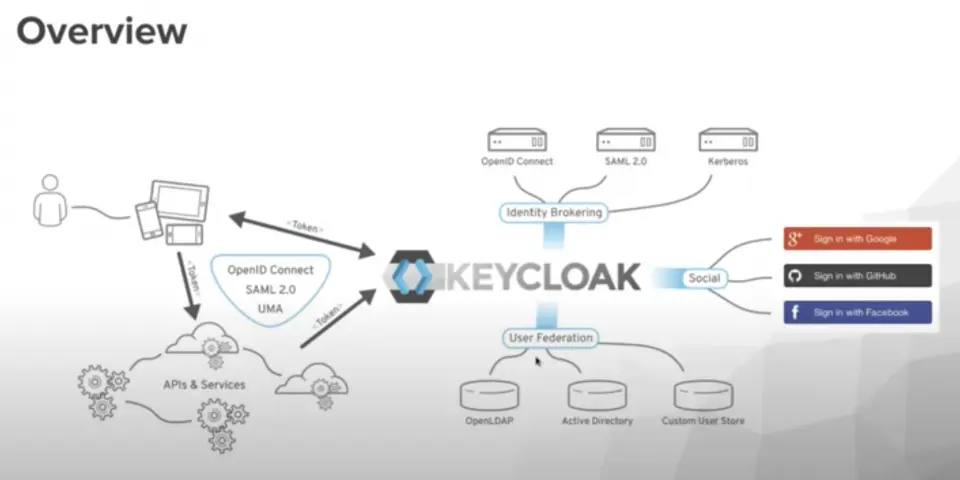
Keycloak stands out for its flexibility in managing authentication protocols, with support for SAML 2.0 in both Service Provider and Identity Provider roles. It also allows integration with LDAP directories and Kerberos systems and offers several multi-factor authentication methods, including TOTP, WebAuthn and Passkeys.
Microsoft Entra ID, on the other hand, prioritizes cloud authentication scenarios based on OIDC and OAuth 2.0. For identity verification, it provides several MFA methods, including Microsoft Authenticator, FIDO2 security keys, passkeys, SMS and voice calls.
Integration with Business Applications and IT Infrastructures
Integration with the Microsoft ecosystem is one of Entra ID’s main strengths. The platform connects directly to services such as Outlook, Teams and SharePoint and allows access to third-party SaaS applications to be managed through preconfigured connectors and automated provisioning based on SCIM.
Keycloak, on the other hand, offers greater integration flexibility in heterogeneous environments, such as hybrid infrastructures, multi-cloud architectures and customized business systems. It can be connected to existing databases, legacy applications and custom-developed components, adapting to the characteristics of the infrastructure already in use.
Security, Identity Management and Access Control
Microsoft Entra ID provides tools dedicated to risk assessment and access protection. These include Conditional Access, available in plans P1 and P2, and Entra ID Protection, which make it possible to apply security controls based on contextual factors, such as the risk associated with the user or device, geographic location and the detection of anomalous behavior.
Keycloak, on the other hand, focuses on flexibility in defining access rules and on the ability to maintain direct control over the data managed by the platform. It supports role-based access control (RBAC), including granular configurations, and allows user attributes to be customized according to application requirements. Installation on infrastructure under the organization’s control also makes it possible to directly manage the retention and accessibility of audit logs.
The main differences therefore concern the approach to security: Entra ID provides integrated tools for contextual risk assessment, while Keycloak makes it possible to define a more customized access management environment that is consistent with the organization’s infrastructure policies.
Ready-Made Templates
Looking for an IAM or IGA platform to manage digital identities?Visit the Yookey website to discover the available solutions.
Which IAM Solution Should Your Company Choose?
The choice between Keycloak and Microsoft Entra ID should start with an analysis of the existing infrastructure, security requirements and level of control required for identity management.
Microsoft Entra ID is an option to consider when:
- The company already uses Microsoft 365, Azure and other services within the Microsoft ecosystem.
- The organization wants to delegate IAM infrastructure management to the provider.
- Integrated features are needed to apply risk- and context-based access policies.
Keycloak is a solution to consider when:
- It is necessary to retain the ability to run the platform on private infrastructure or in multi-cloud environments.
- Control over data location and management is a priority.
- Authentication flows and access rules need to be extensively customized.
- The organization wants to use an open-source solution without software licensing costs, while taking into account infrastructure, maintenance and operational management expenses.
Yookey Keycloak SaaS: Simplifying Identity Management with a Managed Service
For companies that want to adopt Keycloak without having to manage the infrastructure directly, Yookey offers an IAM as a Service solution based on Keycloak, delivered as a fully managed service.
The service covers the activities required to manage the environment, from installation and configuration to updates, with attention to aspects related to GDPR compliance. This allows organizations to use the platform’s features without having to directly handle all the operational activities associated with its management.
Yookey supports Single Sign-On (SSO) and several Multi-Factor Authentication (MFA) methods, including Passkeys, SMS, email and authenticator applications. The Yookey ID variant also offers integration features for Italian digital identity systems, SPID and CIE.
For more comprehensive identity lifecycle management, Yookey can integrate with YooPoint, the Identity Governance and Administration (IGA) software that enables granular control over onboarding and offboarding procedures and user permission assignments.
Speak directly with our team for more information.